Table of contents
- What is NetMirror?
- Is NetMirror safe to use on Android?
- How to check if a NetMirror APK is safe before installing
- Is NetMirror safe for Android TV?
- Is NetMirror legal or illegal in India?
- Is NetMirror banned in India?
- NetMirror risk table: what can go wrong and how to reduce it
- NetMirror safety checklist
- Our verdict: is NetMirror safe or not?
- What are the safer, legal alternatives?
- Conclusion
Is NetMirror safe? It is one of the most common questions about this free streaming app, and the honest answer is "not fully". This guide looks at the real safety risks, the legal position in India, whether NetMirror is banned, and simple steps that lower your risk if you still choose to use it.
Quick answer: NetMirror is not fully safe to use. It is an unofficial app from an anonymous developer, it is not on the Google Play Store, and a VirusTotal scan reported by TROYPOINT flagged some files on its website. It also streams copyrighted content without a licence, which can count as copyright infringement in India.
What is NetMirror?
NetMirror is a third-party, unofficial streaming app and website that shows movies, web series and TV shows from big OTT platforms such as Netflix, Prime Video and JioHotstar in one Netflix-style interface. It does not own or license that content. It started around 2023 as "Netflix Mirror", went offline after server problems, and later returned as NetMirror.
Because it is spread mainly as an APK file outside the Play Store, nobody reviews it the way Google reviews Play Store apps. People asking whether NetMirror is safe or not usually mean two things: is it safe for my phone, and is it legal to watch? We answer both below.
Is NetMirror safe to use on Android?
Is the NetMirror app safe to use? It carries more risk than a normal Play Store app. No single risk means your phone will be hacked, but together they add up.
The developer is anonymous
There is no verified company, address or support contact behind NetMirror. If something goes wrong, such as data misuse, there is nobody accountable you can reach.
A VirusTotal scan flagged some files
TROYPOINT, an independent review site, reported that a VirusTotal scan of the official NetMirror website flagged some files as malicious. Flags can sometimes be false positives, but you should take them seriously and scan any file yourself.
Pop-up ads and redirects
Many users report pop-up ads and redirects to other websites, in the app and on the web version. These ads can lead to fake "your phone is infected" pages or unwanted downloads.
Fake copies use the NetMirror name
Copycat apps called "NetMirror Pro", "NetMirror Mod" or "NetMirror Premium" exist. These are a bigger danger than the original because some are built only to show aggressive ads or collect data.
Unnecessary permissions
A streaming app needs internet and storage access. It does not need your contacts, SMS, call logs or location. If an APK asks for those, deny them or uninstall it.
If you still want the app, follow the checks in our NetMirror APK download guide and scan the file before installing.
How to check if a NetMirror APK is safe before installing
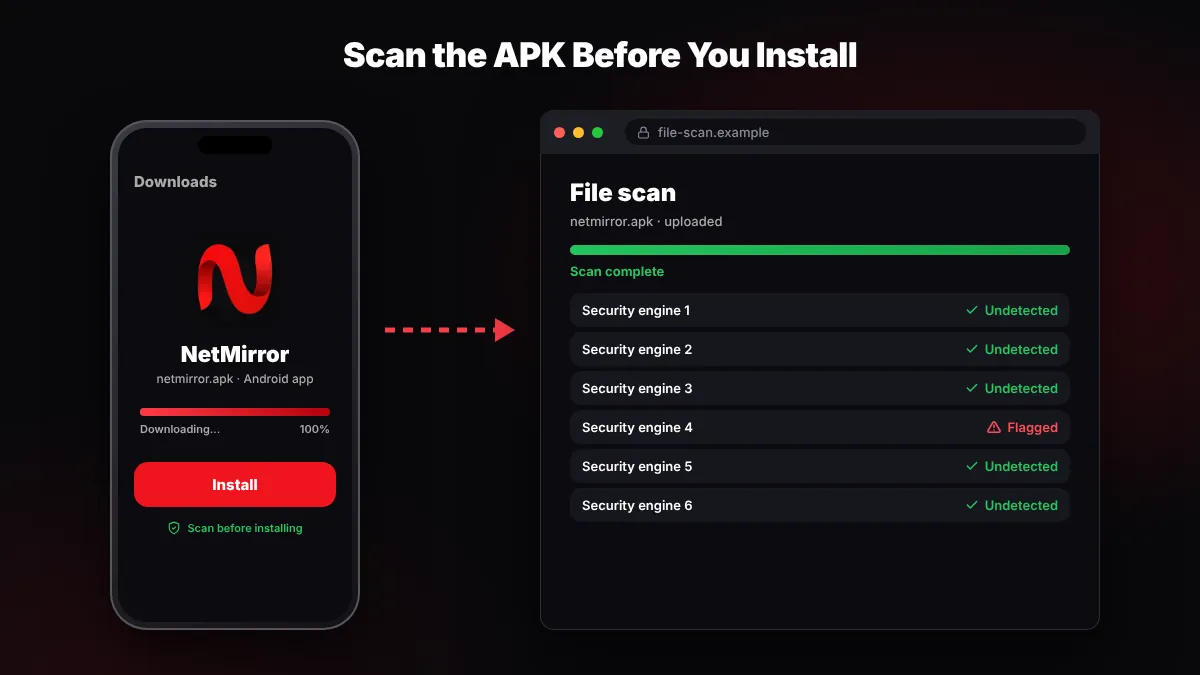
You cannot be fully sure any APK is clean, but a free VirusTotal scan catches many known threats. It takes about two minutes.
- Open VirusTotal. Go to virustotal.com in Chrome on your phone or PC.
- Upload the APK. Tap "Choose file" and pick the NetMirror APK from your Downloads folder.
- Read the result. Several engines calling it malware or a trojan is a clear reason to delete it. One or two "adware" or "riskware" flags are still a warning.
- Run Play Protect. Open the Play Store, tap your profile icon, choose Play Protect and tap Scan.
Is NetMirror safe for Android TV?
NetMirror on Android TV, Google TV or Fire TV has the same risks as on a phone, plus one more: TVs rarely run antivirus apps. Most people install the TV APK with the Downloader app, which requires allowing "unknown sources".
After installing, turn "Install unknown apps" off again for Downloader so other files cannot install silently. Our NetMirror TV guide explains the full setup for Android TV and Fire TV Stick.
Is NetMirror legal or illegal in India?
NetMirror is not a licensed distributor, and it appears to stream copyrighted content without permission from the owners. Using it can therefore count as copyright infringement, depending on your country's law.
In India, the Copyright Act, 1957 protects films and shows. Courts such as the Delhi High Court regularly order internet providers to block piracy websites. Many of these orders are "dynamic injunctions", which let rights holders get new mirror domains of a blocked site blocked quickly too.
Enforcement in India has mostly targeted the websites and the people running them, not ordinary viewers. Still, the user is responsible for what they watch. This is general information, not legal advice.
Is NetMirror banned in India?
We could not verify any public court order that names NetMirror specifically. When people say "NetMirror is banned in India", it usually means some of its web domains are blocked by internet providers, so the site does not open on Jio, Airtel or other networks.
The app was never on the Google Play Store, so there was nothing for Google to remove. Domain blocks are also why the NetMirror web version keeps moving to new addresses, and why fake mirror sites appear so often.
NetMirror risk table: what can go wrong and how to reduce it
No single risk decides whether NetMirror is safe for you, but each one below is easy to reduce.
| Risk | Why it matters | How to reduce it |
|---|---|---|
| Malware in a fake APK | Can show ads, steal data or slow your phone | Download from a source you trust and scan on VirusTotal |
| Anonymous developer | No one is accountable if data is misused | Share no personal details; use a spare email if asked |
| Pop-ups and redirects | Can lead to scam pages and unwanted downloads | Close pop-ups, never install files they offer |
| Extra permissions | Contacts and SMS access can expose OTPs | Deny contacts, SMS, call logs and location |
| Payment scams | "Premium unlock" pages steal card or UPI details | Never pay; NetMirror has no official paid plan |
| Browser extensions | Header-modifier add-ons can read your web traffic | Avoid them or remove after use |
| Copyright issues | Content is streamed without a licence | Prefer legal OTT apps |
If you were told to install a browser add-on for the web version, read our NetMirror extension guide first to understand what it can access.
NetMirror safety checklist
If you decide to use NetMirror anyway, these steps make it safer to use:
- Download only from the source you trust, never from random Telegram links or pop-ups.
- Upload the APK to VirusTotal before installing and read the result.
- Keep Google Play Protect turned on in the Play Store settings.
- Deny contacts, SMS, call log and location permissions.
- Avoid "mod", "premium" or "ad-free" versions.
- Never enter card, UPI or bank details anywhere in the app or site.
- Consider a reputable antivirus app on your phone.
- Turn "Install unknown apps" off again after installing.
Our verdict: is NetMirror safe or not?
NetMirror is not safe in the way a Play Store app like Netflix or YouTube is. The original app may work without problems for many users, but the anonymous developer, flagged files, pop-ups and fake copies make the risk real. The legal side is also grey at best.
Pros
- Free and usually needs no account
- Netflix-style layout that is easy to use
- Subtitles and Hindi audio on many titles
Cons
- Anonymous developer and no support
- Some files flagged by VirusTotal (per TROYPOINT)
- Pop-up ads, redirects and fake copies
- Streams copyrighted content without a licence
What are the safer, legal alternatives?
If you want peace of mind, legal OTT apps are the better choice. Amazon MX Player, YouTube, Waves, and some content on JioHotstar, Zee5 and SonyLIV are free with ads. Netflix and Prime Video need a paid plan. See our full list of legal NetMirror alternatives for a side-by-side comparison.
netmerrorapk.com is an independent guide. We don't host, upload or own any APK or video content and we are not affiliated with NetMirror, Netflix or any OTT platform.
Conclusion
So, is NetMirror safe to use? It carries real risks: an anonymous developer, flagged files, pop-ups, fake copies and copyright problems. If you still use the NetMirror app, scan the APK, keep Play Protect on and share no personal or payment details. For worry-free streaming, a legal OTT app is the safest choice.
Key takeaways
- Is NetMirror safe? Not fully: it is unofficial, comes from an anonymous developer and is not on the Play Store.
- TROYPOINT reported a VirusTotal scan that flagged some files on the NetMirror website.
- It streams copyrighted content without a licence; the Copyright Act, 1957 applies in India.
- No verified court order names NetMirror; "banned" usually means some domains are blocked by ISPs.
- Scan the APK, deny extra permissions, avoid mod versions and never enter payment details.
Frequently Asked Questions
Is NetMirror safe or not?
NetMirror is not fully safe. It is an unofficial app from an anonymous developer, it is not on the Google Play Store, and a VirusTotal scan reported by TROYPOINT flagged some files on its website. Users also report pop-ups and redirects. If you use it, scan the APK, keep Play Protect on and share no payment details.
Is NetMirror banned in India?
We could not verify any public court order that names NetMirror specifically. In practice, "banned" usually means some of its domains are blocked by internet providers, which is why the site may not open on some networks. Indian courts often order ISPs to block piracy sites, including new mirror domains through dynamic injunctions.
Is NetMirror illegal to use?
NetMirror is not a licensed distributor and appears to stream copyrighted content without permission, so using it can count as copyright infringement depending on your country's law. In India, the Copyright Act, 1957 applies. Enforcement has mostly targeted sites rather than viewers, but the user is responsible for what they watch. This is not legal advice.
Is the NetMirror app safe for Android TV?
It carries the same risks as on a phone, and TVs rarely run antivirus apps. Most people install it with the Downloader app, which needs unknown sources turned on, so turn that permission off again after installing. See our NetMirror TV guide for setup steps and safety tips for Android TV and Fire TV.
Can NetMirror steal my data?
There is no public proof that the original app steals data, but the developer is anonymous and fake copies exist, so the risk cannot be ruled out. Deny permissions a streaming app does not need, such as contacts, SMS, call logs and location. Never enter card, UPI or bank details in the app or on the website.
How can I check if a NetMirror APK is safe?
Upload the APK to VirusTotal before installing and see how many security engines flag it. Several malware or trojan flags mean you should delete the file. Also run a Play Protect scan from the Play Store, check which permissions the app asks for, and avoid any "mod" or "premium" version.
What is a safe alternative to NetMirror?
Legal OTT apps are the safer choice. Amazon MX Player, YouTube and Waves are free with ads, while JioHotstar, Zee5 and SonyLIV offer some free content. Netflix and Prime Video need a paid plan. Compare them side by side in our NetMirror alternatives guide.

Written by NetMirror APK Editorial Team
We test NetMirror on Android phones, Android TV, Windows PCs and iPhones and update these guides when the app changes. We are an independent site — read our editorial policy and disclaimer.